In practice it can happen that you only want to copy certain games from one database to another. To do this, proceed as follows:
• Switch to the database window and open the database.
• Select in the list the games you want to copy. If you want to mark individual list entries, hold the Ctrl key and click on the games to be copied.
• If you want to copy a contiguous block of games (e.g. all games of a particular tournament), mark the first entry in the game list. Hold the Shift key and mark the last entry in the list.
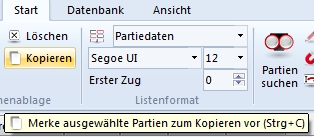
Choose Start – Copy or, faster, Ctrl-C. The entries are then copied to the clipboard.
• Now open the target database for the games to be copied and choose Start – Paste. Confirm with OK and the selected games are copied into the database.