Suppose you are playing a blitz game against the program and have finally achieved a winning position.
Problem: the chess clock keeps ticking and precious thinking time is lost while entering moves. The program offers the option to adjust mouse-based move entry. The required settings can be made in the File menu – Options.
After you have selected the Game tab in the dialog, you will find a section labelled One-click entry there.
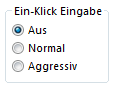
Here you can influence the move entry of the program and make life as a computer opponent – already difficult enough as a "blitz buff" – somewhat easier.
The best thing is simply to try out how one-click entry works. To get to know the advantages of the system better, let us switch on one-click entry by placing a tick next to the NORMAL switch with the mouse.
Now the following happens with mouse-based move entry:
• If you click on a target square of a piece and only one piece can move to that square, the move is executed immediately. The principle is easiest to understand by learning by doing. Simply start a new game. If you want to enter what Bobby Fischer regarded as the strongest opening move 1.e2-e4, you only have to click the e4 square once. The move is then executed immediately. Compared to normal move entry by dragging the piece from the source to the target square, this method saves a great deal of precious thinking time.
• In the advanced stages of the game, the situation will repeatedly arise that several pieces can move to the planned target square. In this case, the piece that last made a move will move to the target square. This option is especially useful in perpetual checks under time pressure but also works very well with piece manoeuvres. These functions are only available with the Aggressive setting.
• If there is no unambiguous assignment of which piece should move to the clicked target square, you have to activate the piece to be moved with a second mouse click.
So far we have been concerned with move entry by clicking on the target square. It can also be done the other way around, by first clicking on the piece that is to make a move. With this method you can also save a great deal of thinking time when entering moves:
• If a piece is clicked that has only one legal move available, the move is executed immediately.
• If you click on the e1 or g8 squares, – if possible – the short castling for White or for Black is performed.
• If you click on a piece that can capture an opposing piece that just moved, the capture is executed. This is useful, for example, when recapturing in exchange series. This option is only available if the Aggressive setting has been selected.
You will most easily learn to understand and appreciate one-click entry by trying it out. The system also serves as an excellent input aid when you want to record your own games with the program and store them in your own database.