A valuable aid when analysing ongoing games is the analysis board, which you can enable under View – Analysis board or via the hotkey Ctrl+Alt+A.
You can use this board for analysis.
The easiest way to grasp the meaning of this feature is to think of the analysis board as a kind of pocket chess set. Suppose you attend a well-attended GM tournament and try to follow the action on the boards. What do you do if your own calculating skills are not sufficient? Right, you use a pocket chess set to follow critical variations. Of course, this is also easily possible on the PC, but every so often you want the option to compare the final position of a variation with the real position on the main board directly – without having to step back and forth in the notation. With the analysis board, this is possible.
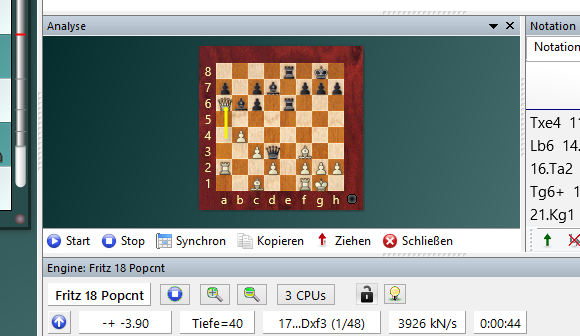
After you have enabled the analysis board, you will notice that by default it is shown a bit smaller than the regular chessboard and that some function buttons are located at the bottom edge of the analysis board.

Crucial for a better understanding of the feature is now the fact that you can play moves on the analysis board without affecting the position on the main board. It is very important to grasp this principle. If, in our example, you analyse a variation on the pocket chess set, the events on the main board – the imaginary GM game – are not touched either. With a deeper variation or multiple tries, it would often happen with the "classic method" that you have problems reconstructing the starting position. With the digital analysis board, this form of analysis becomes much easier, the direct comparison between starting and variation position is possible at a glance. As on a pocket chess set, you can enter moves on the analysis board. Try this out after loading any game into the board window. Activate the analysis window with Ctrl+Alt+A. If you now try an alternative move on the "pocket chess set", the Enter new move dialog appears.
At this point, it must be clarified what the five options in the dialog mean.
• New variation This option will be the one you use most frequently. It starts a new variation on the analysis board with the previously entered move.
• New main variation The move played on the analysis board is adopted as the main variation, while the current notation is demoted to a variation.
• Overwrite Overwrites the current move and deletes all subsequent moves.
• Insert This option works in principle just like "Overwrite", with the difference that legal successor moves are not deleted or cut off.
• Cancel Undoes the input of a move.
You can now enter any number of variations and analyses on the analysis board. When you close the analysis board, you will notice that the variations have not been transferred to the notation of the main game. As soon as you open the analysis board again, the variations are back. This applies as long as you have not loaded a new game into the board window. Occasionally, you will want to transfer one or more variations into the main notation. Of course, this is possible. Let us take a look at the function buttons below the analysis board.
• Start Pressing the Start button activates the analysis board and transfers the current board position onto the "pocket chess set".
• Stop This deletes the contents of the analysis board and returns to the main board with the original game notation. All moves entered on the analysis board so far are no longer shown in the notation. If you click Start again, the analysis notation is reinstated. Note that after loading a new game and later returning to the original game, the variation moves are lost, even if you click Start again.
• ? Sync With this function you automatically synchronise the positions on the main and the analysis board. For example, if you have entered a long-winded variation and want to return quickly to the main notation, a click on this button is enough. The current position from the main board is copied to the pocket chess set, and the move of the main variation is shown inverted in the notation.
• Copy If you have loaded an annotated game, you can use this command to transfer the entire main notation including analyses to the notation of the analysis window before you have entered a move on the analysis board. You will notice this because the normal notation window is replaced by that of the analysis window. All variations and comments of the main game are taken over.
• ! Move This activates the calculation of the most recently active chess engine. In the engine window, at the top edge, there is a small Move button. When you click the button, the move favoured by the engine is played.
• X Close This function is easy to understand. The analysis board, i.e. our pocket chess set, is simply put away again.
Be aware that you must explicitly save or replace new analyses or variations in the database before loading a new game. Otherwise, the temporarily available analyses are lost.
Tip: On the chess server, the analysis board is also useful. You can use it as a pocket chess set while watching games between very strong players.