Game databases such as the MegaBase contain many annotated games. With the help of the program's search function, you can search specifically for such games. Start the search mask and click on the "Comments" tab. A new window opens in which you can define the search for comments exactly.
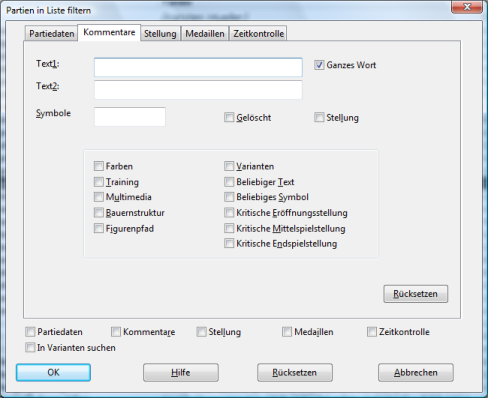
If the database is to be searched for games with any text comments, activate the option "Any text". With a click on OK you start the search and all games with integrated text comments are listed. If you now, for example, click on the "Game data" tab, you can see that the Comments option is enabled and can be combined with other criteria.
The "Position" switch filters all games from the database that do not start with the initial position but with a game fragment, a chess position. In a game list such game data are always marked with a "P".
If you mark the "Colours" option, the program filters out all games from the database that have been annotated with the help of coloured squares and arrows.
The search works similarly with the other options; for example, "Training" delivers all games with integrated training questions, etc.
Games containing variations are found with "Variations", and "Any symbol" filters games from the database that have been annotated with the symbols known from the Informator.
If you want to search specifically for games with a quite specific symbol, you can define the search for it in the "Symbols" input line.
Example: How do you find all games in the database annotated with the "Unclear" symbol? In the search mask, insert the corresponding abbreviation in the "Symbols" input line, e.g. with CTRL-3 for "Unclear".
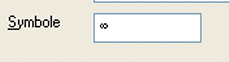
The search function now lists all games rated as unclear by a commentator with the help of the symbol. When you load the game with a double click, you do not have to laboriously search for the corresponding comment. In the board window the position appears immediately before the comment; within the notation, the cursor is placed one move before the critical position.