There are several possibilities to prepare game notations for sending via email with the help of the program. An elegant, largely automated method is available when the games are already saved in a game database.
The following steps are necessary:
Switch to the list view in the database window and mark the game entry/entries that you want to send via email.

After the selection has been made with the CTRL key held down and a mouse click, activate the context menu Output – Email with a right-click.
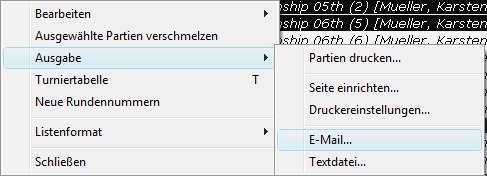
This automatically calls up the mail program recognised as the default mailer. The program takes all required steps off the user's hands. The marked games are packed into a compressed database with the file extension *.CBV and directly attached to the email.
In the mail program you only have to enter the recipient who should receive the games.
The recipient of the email can immediately open the packed database with the program or ChessBase in the database window. The fastest way is in the database window via Open – Database. Ensure that in the "Select database" dialog the file type *.CBV is selected for the compressed database format.