Since the first engine analysis with Fritz under DOS in the early 1990s, the concept has remained more or less unchanged: a position evaluation in the form of numbers and letters. The evaluation in pawn units gives the user clear indications of how a chess engine assesses the current board position – the visual display goes a step further.
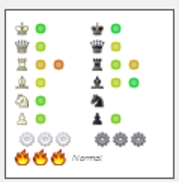
The program visualises the placement of the pieces, pawn structure, king safety, general activity and the sharpness of the position as a graphical display in the engine window. The user thus sees at first glance how the engine evaluates the aforementioned important factors.
Note: Via right-click in the engine window, you can switch between the variation board and the visual display. The visual evaluation is available in every engine window: right-click → Visual evaluation.
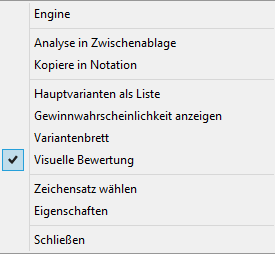
Move the mouse in the engine window over the activated visual evaluation.
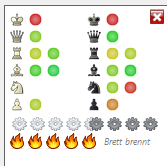
This changes the display in the board window.
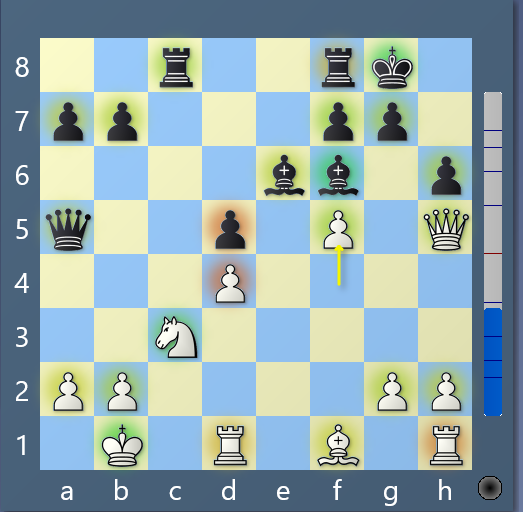
So if you move the mouse in the engine window over the area of the visual evaluations, the individual pieces are highlighted on the board, which is especially informative for the pawns.
The colour markings on the individual pieces show how well a piece is placed. The interpretation of the visual display is simple and works as usual on the traffic-light principle. Green is very good, red very bad. For the king, king safety is weighted highly; for the pawns, the quality of the pawn structure and the strength of passed pawns add up.
Below the piece symbols, the visual display of the engine window shows the mobility and activity for Black and White in five levels. The engine's evaluation is shown by the small gears.
Particularly interesting is the classification of sharpness/complexity of a position in five levels (one to five flames).
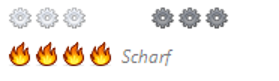
This way you can see at a glance whether a sharp, tactically charged position is on the board.