The program is excellent for training chess openings. The program plays its moves in the initial phase directly without calculation. Reason: the program has access to an opening file in which many established opening moves are saved. The opening file of a chess engine is called an openings book or library.
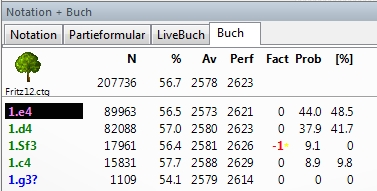
The program's opening file is a database that contains only positions. For this reason the format of the openings book is also called a position tree. For opening training, a position tree offers the following advantages:
• For any board position you get an overview of all moves played, including meaningful statistics.
• Transpositions are reliably recognised by this concept.
The program already includes a large position tree. In practice, however, you will often want to create your own, topic-specific openings books for your training. You can easily implement this with the program.
Basics
Suppose you want the computer to play exactly the openings that Garry Kasparov uses in his own practice. Opening systems used by the best chess player of all time must have advantages that you may want to try once against your electronic "grandmaster".
We have to make some preparations and need:
1. A new openings book
2. A database with games by Garry Kasparov, which serves as the basis for our openings book.
Tip: The procedure for creating a new book is always the same. You need an openings book and games (a database) that you can import into your openings book.
Create a new book
The fastest method to generate a new position tree is the key combination Ctrl-Shift-Alt-F11. In the file selection box you can enter a name for your new book, e.g. Kasparov.Ctg.
Tip: Remember that books are always recognised by the file extension CTG.
Create database
Now we still need a database with Kasparov games that we want to import into our new book. How do we get these games? An ideal basis is the game collections we deliver, Big DataBase/MegaBase. Let us now create a new database that we then want to fill with Kasparov games. The following steps are necessary:
• Create a new database. To do this, press the F12 key to get to the database window. Now click on the icon in the function bar or choose the key combination Ctrl-X. In our example we give the name Kasparov.cbh to our new database.
• Now we have to copy Kasparov's games from the MegaBase or another source database to our new database. Open the source database that contains games by Kasparov and press the key combination Ctrl-F. Now enter Kasparov as the search term in the program's search mask.
• The program now searches the source database and lists all games by Kasparov from the period 1976 - 2000. These games, which serve as our data basis for the new book, we have to save in the newly created database.
• Mark the first entry in the list with the search results and press the key combination Shift-End. As you can see, suddenly all list entries are highlighted dark. Now press the key combination Ctrl-C to copy the games to the clipboard.
• Switch to the newly created database with the Kasparov games. Press Ctrl-V to insert the games into the new database. The program asks for the target database, in our example the newly created database Kasparov.cbh. Confirm with OK and we have a game database with 1843 games, which serves as the basis for our new openings book.
Import games into the book
Now we come to the last step: we transfer the Kasparov games into our previously created openings book. In the main screen of the program, under the menu item Analysis / Openings book, we find the entry "Import games". Of course we specify our new database Kasparov.Ctg as the source in the file selection box and confirm with Open. The program now confronts us with the Import games dialog box, which looks as follows:
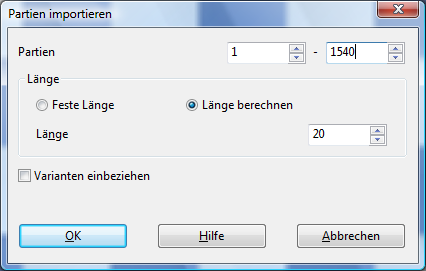
The program "thinks along" and wants to know whether each game should be taken stubbornly up to a particular move or on the basis of ECO (= Encyclopaedia of Chess Openings). We decide for the second option and confirm with OK.
Done! As you can now see in the book window next to the chessboard, the book is filled with content and the program will from now on orient itself by the opening repertoire of Garry Kasparov.
You can control the program's opening behaviour via the dialog Book options. On the main screen press F4 to set the desired preferences.
Engaging with the possibilities of the position tree is definitely worthwhile. There is no better tool for professional opening training, since the application possibilities of this feature are virtually inexhaustible. Create, for example, with the help of the ECO classification or with the opening key a position tree that contains only your favourite openings, or prepare for your future opponents by feeding the program with their games.