On the internet, data formats based on pure ASCII text are mainly used. For saving chess positions the EPD format is frequently used. Problem: How can you export or import an EPD file from the program?
Generate EPD string
To generate an EPD string of the current position, proceed as follows:
• Switch to the position setup of the program, e.g. by pressing the "S" key.
• There you will find, among other things, the "Copy FEN" switch. With this you copy the EPD string for the current board position to the clipboard.
• Leave the position setup WITHOUT clicking the OK button.
• The position is now in FEN or EPD format in the clipboard and can be transferred to another application, e.g. to your email program.
Insert EPD string
An EPD string can of course also be inserted into the program. Suppose you receive in an email a text entry that looks like this:
2rq1rk1/3bbppp/p3pn2/1p1pN3/2nP1B2/P1NBP2Q/1P3PPP/2R2RK1 w - - 0 1
This is an EPD string that the program understands without problems and converts into a "real" chess position. To do this, proceed as follows:
• Mark the EPD string shown above in your browser and choose, e.g. in Internet Explorer, from the Edit menu the entry Copy. The EPD string is now in the clipboard.
• In the program press the "S" key to get to the position setup of the program.
• A click on the "Insert FEN" button, followed by OK, is enough to convert the cryptic text into an understandable position.
The position looks like this in the program:
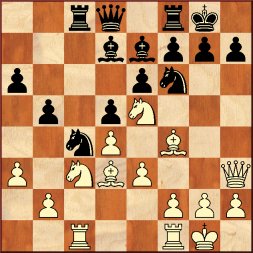
This position comes from the game Frydman – Vidmar, 1934.
White won after 1.Nxd5! exd5 [1...g6 In the game 1...g6 2.Nxe7+ Qxe7 3.Bxc4 Rxc4 4.Rxc4 bxc4 5.Bg5 resigned] 2.Nxd7 Qxd7 3.Bxh7+ Kh8 4.Bf5+ 1-0