You have the option of adjusting the "Lighting settings".
The settings are made in the "Adjust lighting" dialog.
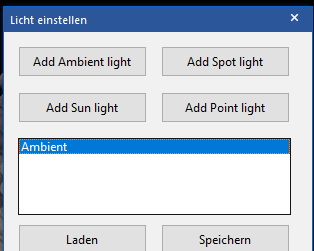
The default setting is "Ambient Light". The program supports three further modes.
Spot Light
This setting provides a very direct light source. A great advantage of this rendering is the direct orientation of the light source. The lighting is shown as a cone, and the user can set the angle that illuminates the lit area. Objects closer to the light source are displayed brighter, and depending on the cone width the light is rendered softer or sharper accordingly.
Sun Light
This imitates the natural lighting of daylight. You can imagine the lighting as a giant flash light positioned very far from the targeted objects and permanently centred. You can change the perspective (direction) of this light source as desired.
Point Light
This setting is used by most 3D programs. The rendering closely resembles the lighting characteristics of a light bulb that sends light in all directions.
The properties correspond to a light sphere that emits light in all directions. Objects closer to the light are rendered brighter, and objects further away are rendered correspondingly darker. This setting is ideally suited if you want to depict areas with even light reduction in all directions.
The program offers the option of adding to or deleting these various settings. You can also add new settings, and you can change the colour of the light source to a custom value. Using "Reset", you restore the default settings.