The Endgame Turbo 5 can be loaded directly from the USB stick in ChessBase or Fritz. If there is enough free space on your hard disk, you can also install the endgame databases on your computer. However, the Endgame Turbo 5 requires almost 120 GB of disk space.
Use from the USB stick
Close all programs and connect the USB stick to your computer via one of the USB ports.
Start the program “ChessBaseEndgameTurboSetup.exe” from the USB stick. Select the installation language and go to “Next”.
In the following dialog “Select components” accept the default setting and go directly to “Next”:
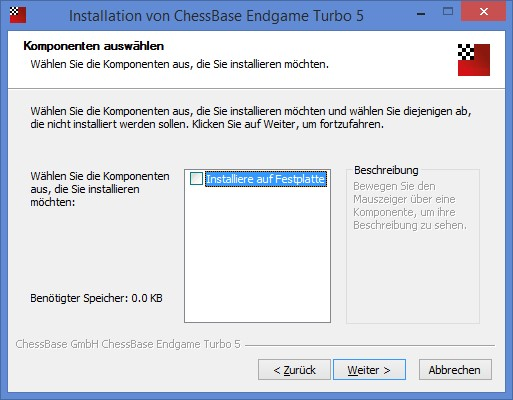
Since the installation program only has to write one piece of information into your settings of ChessBase and Fritz, the process only takes one to two seconds! Complete the process in the next dialog with “Finish”.
Now start your ChessBase or Fritz program and put, for example, a six-piece endgame on the board. Now start the infinite analysis (Alt+F2). In the engine window you will now see the evaluations from the Endgame Turbo 5 displayed, namely for all legal moves in the current board position:
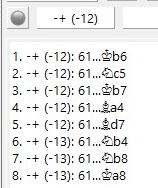
+- means that White wins.
-+ signals a win for Black.
= means draw.
For won or lost positions a number in brackets also appears, which offers additional information about the position: it indicates in how many moves at the latest the next irreversible position will be reached, i.e. when a pawn is moved or material disappears from the board. In pawn endgames this information will almost never be relevant, because pawns are moved very often. But in endgames without pawns, in which no material is captured for a long time, the 50 move rule often comes into play. In the example above, the minimum number of moves until a new irreversible position is reached (in this case until the advance of the black passed pawn) is 12 moves.
If the engine does not immediately list the evaluation of all legal moves as desired but calculates variations instead, the access to the tablebases is not set up correctly.
Solution: In CB or Fritz go to the File menu, “Options”, “Tablebase”, “Edit”:
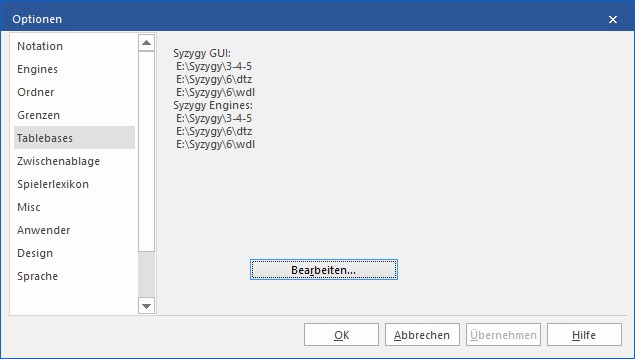
In the next dialog select “Syzygy (GUI)” at the top and tick the box “Load at program start” on the right.
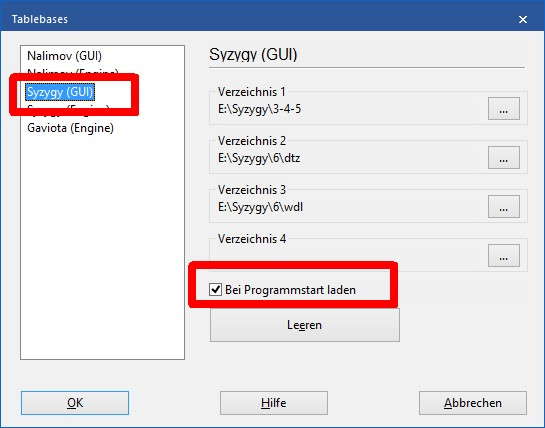
Then restart your ChessBase / Fritz program once.
Tip: The engines Houdini 6 and Komodo 11 can already use the knowledge of the Endgame Turbo in positions in which there are still more than six pieces on the board, e.g. when possible simplifications into six-piece endgames have to be calculated. This early access leads to a further increase of the engine performance in the endgame. The Fritz 16 engine, on the other hand, does not support this technique. For the analysis of more complex endgames the use of Houdini 6 or Komodo 11 is therefore recommended!
Installation on hard disk
Please first check whether there is enough free space on your hard disk. The installation of the Endgame Turbo 5 requires almost 120 GB. Close all programs and connect the USB stick to your computer via one of the USB ports. Tip: If possible, choose a USB 3.0 port to speed up the installation process considerably!
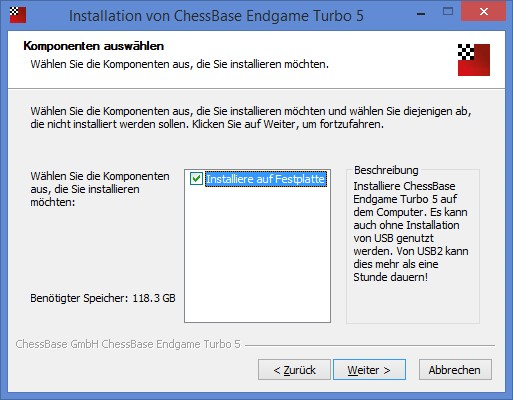
Start the program “ChessBaseEndgameTurboSetup.exe” from the USB stick. Select the installation language and go to “Next”. In the following dialog “Select components” tick “Installation on hard disk” and go to “Next”:
Please accept the preset installation path and let the installation run through. On systems with older USB ports, writing the files can take up to 2 hours.
After completing the installation, start your ChessBase or Fritz program and check the access to the endgame databases as described in the example above.