Another plus of the position tree: Our chess engines can use the tree as an opening library. In terms of opening knowledge, you always have an "all-knowing" theoretician at your disposal, against whom you can immediately try out newly acquired opening knowledge in practice.
Additionally, Let's Check provides access to a large online database that can be used in the program as an openings book.
Our chess engines demonstrate a certain intrinsic intelligence when accessing or selecting moves from the position tree. The success rate of a move is of course the primary factor in playing preferences. In addition to the list entries already discussed, you will find additional information under the Fritz entry that shows how the tree is used by the program. Specifically, this entry shows the weighting of individual moves by the chess engine.
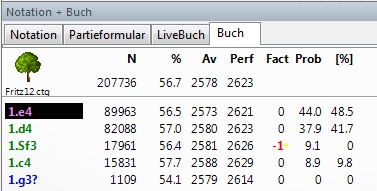
Meaning of the Fritz column: This column shows the value for the move weighting. The value ranges from +125 to –125 and influences the probability with which a particular move is played by the chess engine. The chess engine is even able to change these values independently. As a user, you can also change the playing probability with a right-click on a move – Change weighting. A move with a high weighting is played more often than a move with a low value. With a value of +125 the move is always played, with a value of -125 never.
Meaning of the Prob column: Two values are displayed in this column at the same time. The left value represents the playing probability based on the frequency of a particular move and the results that have been achieved with the move. Under these criteria a move is played if no weightings or evaluations are yet present for the move!
The second value stands for the final evaluation of a move if a rating has been made by the program or the user.
Tip: Komodo & Co are capable of learning and are able to modify the entries in the library independently. All modifications made are marked with a small star located right next to the rating.
The learning ability of course only comes into play if the position tree is on the hard disk. On the write-protected DVD-ROM medium, the program of course cannot make any changes!
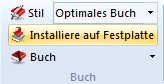
Problem: How do I copy the book to the hard disk? You can transfer the position tree to your hard disk with the Copy book to disk function. The function is located under Analysis – Install on hard disk.