Menu - View
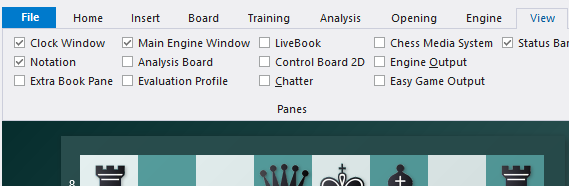
This opens a submenu in which all the program windows are listed. They are called "panes" because most are normally nested in the main program window that is currently being used. The individual panes can be switched on or off. You can also close them directly by right-clicking them and selecting “Close”. |
Here's a description of each window element:
The game notation, variations and commentary. | |
Chess clocks with optional engine logo. | |
Provides information on the thought processes of the chess engine during the game. It can include a variation board. | |
Graphically displays the evaluation and times used in the course of the game. | |
A separate window for the openings book "tree" with full statistics for each move (normally this is a rider in the notation pane). | |
Displays a separate board for analysis. | |
This produces a second 2D board which you can use to follow the game (especially if the main board is in 3D and hard to read). | |
Displays the program's written remarks during the game. | |
Measurements | Shows position-information measurements (formerly called "Explain all moves") for the current position. |
A special audio and video system that allows you to see a player or teacher who moves the pieces on the graphic chessboard. | |
Easy Game Mode analysis results. | |
Information line at the bottom of the screen. | |
Information from the LiveBook. | |