Problem: The program indicates all moves on the chessboard with yellow arrows.
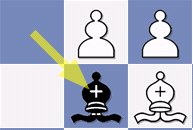
You want to turn off the display but cannot find the corresponding option.
Solution
• In the File menu, select Options. In the dialog you will find several entries, including the Game section.
• In the dialog there is the switch "Yellow arrow marks Fritz move". If the program indicates its moves with a yellow arrow, the option is activated with a check mark.
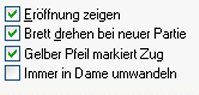
• Remove the check mark with a mouse click and confirm with OK.
• Now the move indicator with the yellow arrow is deactivated