Menu File – Options – Clipboard
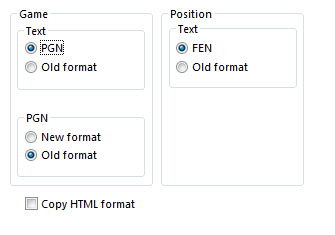
In this dialog you can specify in which format you want games and positions to be stored in the Windows clipboard. From there they can be pasted (with Ctrl-V) into a text editor or paint program.
Game
Edit – Copy game (or Ctrl-C) copies the game notation into the Windows clipboard. You can specify whether it should be in PGN or Old format, and if it is PGN whether it should be the Old format (easier to read) or the New format (better for some chess programs).
This is the Old format:
(60) RyCooder (2614) - Klosterfrau (2424) [B40]
Rated game, 3m + 0s Main Playing Hall, 17.02.2002
1.e4 c5 2.Nf3 e6 3.d4 cxd4 4.Nxd4 Qb6 5.c3 a6 6.Nd2 Qc7 7.f4 Qxf4 8.Nc4 Qxe4+ 9.Be2 Bc5 10.b4 Ba7 11.Nd6+ 1–0
This is a PGN header
[Event "Rated game, 3m + 0s"]
[Site "Main Playing Hall"]
[Date "2002.02.17"]
[Round "?"]
[White "RyCooder"]
[Black "Klosterfrau"]
[Result "1-0"]
[ECO "B40"]
[WhiteElo "2614"]
[BlackElo "2424"]
[PlyCount "21"]
This is the Old PGN notation
1. e4 {1} c5 {0} 2. Nf3 {1} e6 {0} 3. d4 {2} cxd4 {1} 4. Nxd4 {0}
Qb6 {0} 5. c3 {5} a6 {5} 6. Nd2 {3} Qc7 {7} 7. f4 {2} Qxf4 {5}
8. Nc4 {7} Qxe4+ {6} 9. Be2 {2} Bc5 {10} 10. b4 {2} Ba7 {2}
11. Nd6+ {Klosterfrau resigns (Lag: Av=0.9s, max=4s) 1} 1-0
This is the New PGN format
1. e4 {[%emt 0:00:01]} c5 {[%emt 0:00:00]} 2. Nf3 {[%emt 0:00:01]}
e6 {[%emt 0:00:00]} 3. d4 {[%emt 0:00:02]} cxd4 {[%emt 0:00:01]}
4. Nxd4 {[%emt 0:00:00]} Qb6 {[%emt 0:00:00]} 5. c3 {[%emt 0:00:05]}
a6 {[%emt 0:00:05]} 6. Nd2 {[%emt 0:00:03]} Qc7 {[%emt 0:00:07]}
7. f4 {[%emt 0:00:02]} Qxf4 {[%emt 0:00:05]} 8. Nc4 {[%emt 0:00:07]}
Qxe4+ {[%emt 0:00:06]} 9. Be2 {[%emt 0:00:02]} Bc5 {[%emt 0:00:10]}
10. b4 {[%emt 0:00:02]} Ba7 {[%emt 0:00:02]} 11. Nd6+ {Klosterfrau
resigns (Lag: Av=0.9s, max=4s) [%emt 0:00:01]} 1-0
Position
The current position is copied into the clipboard either as FEN or in the Old format (a traditional text description). Both are described in the position setup.
RTF: With Game Data
When this checkbox is enabled, the RTF (Rich Text Format) clipboard variant is augmented with the game header data, so applications that paste in RTF mode receive the players, event, ECO, etc. as well.
Copy HTML format
If you switch on this option then the program will generate HTML code when you press Ctrl-C in a game. This you can paste in a word processor, HTML editor or email client.
The program copies the game in many different formats in the clipboard. These include plain text, PGN and RTF. In many applications there is a "Paste Special" which allows you to select the one you want. They are all present at the same time in the clipboard. "Copy HTML format" simply ensures that this is also available.
Below you can see what the HTML code looks like in the clipboard. The background colour is a pale yellow, the game header is in headline size three, and the moves are in a separate paragraph without line breaks. The output should look very nice
<HTML>
<HEAD>
<TITLE>ChessBase HTML output</TITLE>
<META NAME="GENERATOR" CONTENT="Fritz 9">
</HEAD>
<BODY BGCOLOR=#FFFDE8>
<P><H3>(141) Zukertort,Johannes Hermann - Blackburne,Joseph Henry [A13]<BR>
London, 1883<BR>
</H3></P>
<P>
1.c4 e6 2.e3 Nf6 3.Nf3 b6 4.Be2 Bb7 5.0-0 d5 6.d4 Bd6 7.Nc3 0-0 8.b3 Nbd7 9.Bb2 Qe7 10.Nb5 Ne4 11.Nxd6 cxd6 12.Nd2 Ndf6 13.f3 Nxd2 14.Qxd2 dxc4 15.Bxc4 d5 16.Bd3 Rfc8 17.Rae1 Rc7 18.e4 Rac8 19.e5 Ne8 20.f4 g6 21.Re3 f5 22.exf6 Nxf6 23.f5 Ne4 24.Bxe4 dxe4 25.fxg6 Rc2 26.gxh7+ Kh8 27.d5+ e5 28.Qb4 R8c5 29.Rf8+ Kxh7 30.Qxe4+ Kg7 31.Bxe5+ Kxf8 32.Bg7+ Kg8 33.Qxe7 1-0</P>
</BODY></HTML>