Fritz 21 Handbook
Copy tree to hard disk not available
Menu Analysis - Copy tree to hard disk
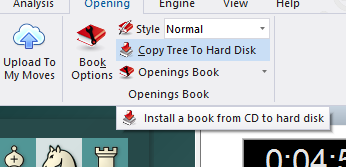
It only works when you have loaded a book from CD/DVD and does not yet exist on hard disk.
If you want to copy a book from CD/DVD drive, then load it first. You can do this by clicking on the tab "Openings book" on top of the annotation window.
If there is already a book loaded, right click on an empty spot in the window pane and select "Close book file". A button "Load book" appears.
Click on the button and select the book from CD. The file should have the extension *.ctg
After you have loaded the book, the function "Copy tree to hard disk" will be available.