Board window, CTRL-ALT-S
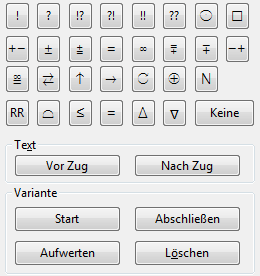
The commentary palette contains all the commentary symbols for moves, which can be set here with a single mouse click.
Meaning
The symbols in the first row are move evaluations. They go directly after the move in the notation.
The symbols in the second and third rows are mostly position evaluations. They appear in the notation after the move evaluation. The symbols in the fourth row are placed before the move.
The (None) button removes all symbols from the selected move.
Text before move / Text after move - entry of a text comment before or after the move highlighted in the notation.
Start variation - takes back the current move on the board. The alternative move you then enter becomes a variation without any prompt (T-note).
Promote variation - the selected variation becomes the main continuation one level higher. This can be undone via Edit -> Undo.
Delete variation - deletes the selected variation and all its sub-variations. This can be undone via Edit -> Undo.
End variation - ends the entry of a variation and goes to the position after the main move, so that you can continue with the main line.