In combination with the program you can use the DGT electronic chessboard. For some time now the manufacturer has been offering a new electronic chess clock for the tournament-size board.
The XL chess clock offers an interesting feature for users of the program: besides displaying the time used, the clock also shows the move just played. Since the DGT board has no LEDs and you normally have to rely on the move announcement via the sound card, this option of the XL clock makes operation possible without any sound output.
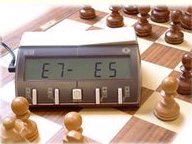
When operating with the program, communication problems can sometimes occur. Via the function Board - DGT board a small program is started that shows the connection. The connection to the board is found by the program, but the new XL chess clock cannot be controlled?
DGT offers a test program called "DGTEBDLL_Test.exe". If you call DGTEBDLL_Test.exe before starting the program, the clock is found. If the program is started first, the clock is not found?
Solution: in the DGT directory you will find the corresponding DLL named DGTEBDLL64.dll (64-bit) or DGTEBDLL.dll (32-bit). Overwrite this file with the version supplied by DGT. After that the move display in the XL chess clock works.