If you analyze a game in Fritz with a chess engine running in parallel, the program can display prose text comments about the current board position directly in the main engine window. The feature responsible is Annotated Engine Variations, switched on via a checkmark in the engine window’s right-click context menu.
(This is independent of the buddy engine. The buddy panel shows only numeric evaluation, depth and time, plus move-quality flags such as ?, !, ??, !! — no prose text.)
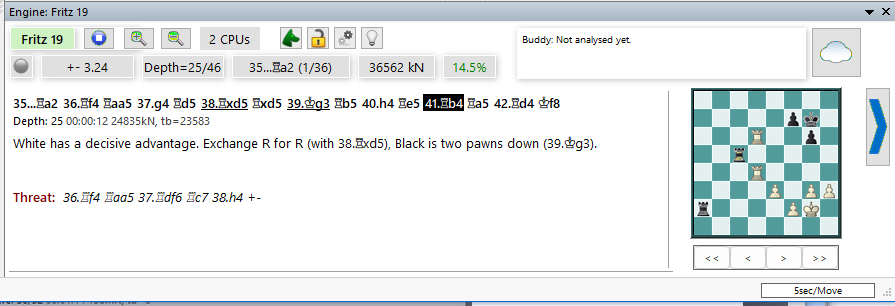
The annotations describe what the engine considers relevant: material balance, pawn structure, piece activity, king safety, tactical motifs, and similar position features. They appear directly under the engine’s numeric evaluation. You can transfer them to the game notation, edit them, and save them together with the game.
A left-click on a text-annotation line in the engine window inserts that comment directly into the notation. A left-click on a variation line inserts the moves of that variation instead.
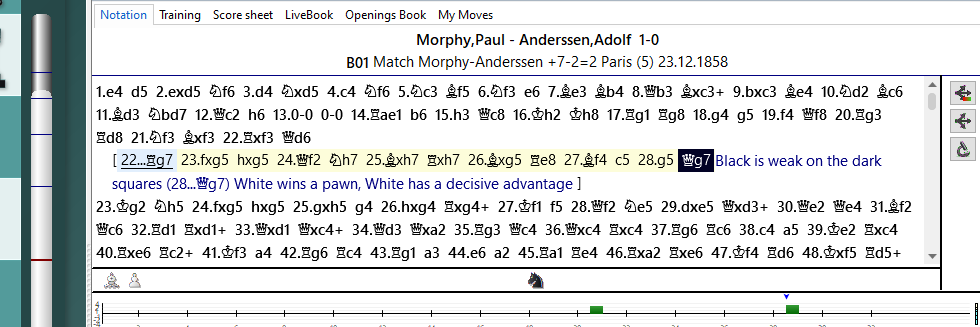
Tip: the more computing time the program has at its disposal, the more detailed the annotations become.