Menu File – Options – Game
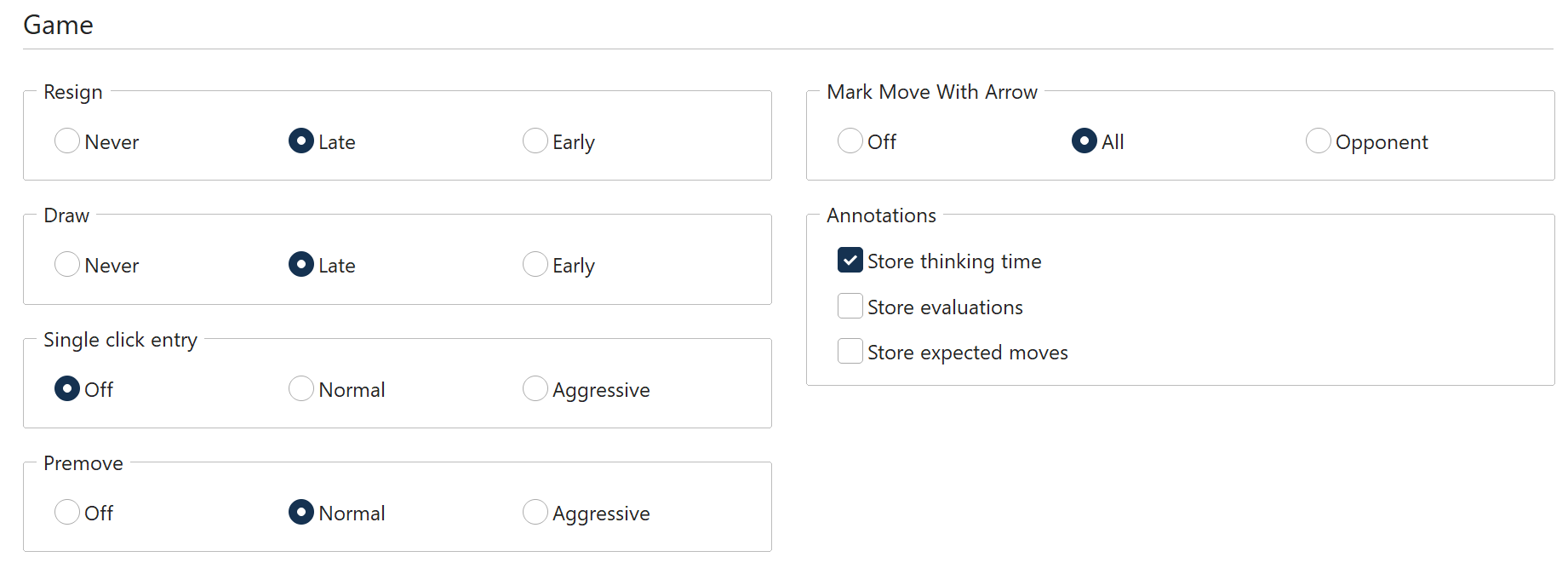
Here you can set a number of parameters relating to the games.
Resign: choose between "Never", "Late" and "Early". "Late" means that the program will have to see three times in a row an evaluation of 6.5 pawn units or worse for itself before it throws in the towel. "Early" means it has to see minus 4.8 three times. "Never" means exactly that. Note that the program will not resign if it sees that it's being mated. Why spoil the fun?
Draw: This has the same type of options as resigning – Never, Late and Early.
Single click entry: It's a blitz game, you are completely winning, but your time is running out. Use the single-click entry to avoid this situation. Three settings are available:
Off: Single-click entry is disabled; you must always click and drag (or click both source and destination square).
Normal: If you click a square to which only one piece can move it is immediately moved there. If more than one piece can move to the square then you must click it for the move to be executed. If you click g1 or g8 and short castling is legal it will be automatically executed.
Aggressive: Same as normal, but if more than one piece can move to the clicked square the piece that last moved will automatically be chosen. This allows you to execute a long check sequence or a king march very rapidly. A second difference: if you click a piece that can make a number of moves, if one of these captures the piece the opponent has just moved, then the capture is automatically executed.
Note: You can use a special technique called "dropping". This entails picking up a piece while your opponent is still thinking and holding it over the destination square. As soon as the opponent's move comes you let go of your piece, using practically no time on your clock. It is a slightly dangerous technique – if the opponent plays something unexpected you may let go the piece and then face disaster. Still dropping is used extensively in fast games on the chess server.
Premove: Lets you enter your reply on the board before the opponent has moved. The same three settings as for Single click entry are available: Off, Normal and Aggressive.
Mark move with arrow: Your opponent's moves can be marked with an arrow, so you can catch them more easily. This is especially useful when you play on the Internet. Three settings are available: Off (no arrow), All (arrow on every move) and Opponent (arrow only on the opponent's moves).
Annotations: this group lets you record what the program writes into the notation while you play (Store thinking time, Store evaluations, Store expected moves). It is described in detail in "Options – Clocks and Notation".
Note: A number of options that older Fritz versions kept on this tab have moved elsewhere in Fritz 20:
– Coach calculation time and threshold are now on the Misc tab, in the "Help" group.
– "Show opening" (ECO codes and names in the status bar) is now on the Misc tab, in the "Game entry" group.
– "Always promote to queen" is now on the Misc tab, in the "Game entry" group.
You can flip the board manually at any time with Ctrl-F.