The program offers the option of using several engines in parallel to analyse positions. In practice this means that when replaying a game or checking a position you can view the evaluations of different programs at the same time. This also works extremely well on computers with a single processor.
The Kibitzer
Who doesn't know him? The annoying “kibitzer” who at the chess club keeps interfering in a running game without being asked. The program obviously also has a kibitzer, as you can see by taking a critical look at the menu entries under Window - Kibitzers. In contrast to its human counterpart, the “program kibitzers” behave considerably more constructively, because they do not add their two cents in the form of a position evaluation unasked, but only at the express request of the program owner.
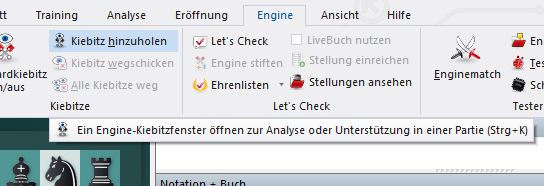
Let us note in advance: parallel analysis is realised in the program with the function "Engine - Add kibitzer". In the Load engine dialog box we can now define which of the available engines should join the calculation of the current position.
Tip: The greater the number of active kibitzers, the higher the probability that your system will react somewhat sluggishly. This function costs a fair amount of computing power. The program interface allocates the same resources to the active engines as far as possible.
Note that a maximum of eight engines can be active.
The kibitzer in action
The kibitzer, i.e. a chess engine, is loaded into its own window where it displays its evaluations of the current position. In principle, when using this function you have to distinguish between the normal playing mode and the analysis mode. In playing mode a kibitzer only calculates while its human opponent is to move. A glance at the variation suggested by the kibitzer gives you valuable assistance in choosing your move. This function is primarily intended as assistance during a running game. As a serious chess player you will of course not accept advice from third parties during the game and can also switch the feature off, e.g. by right-clicking in the respective variation window.
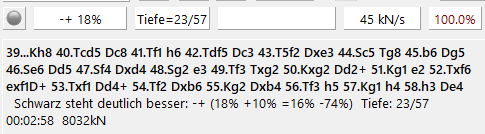
The kibitzer function is particularly interesting in the normal analysis mode, e.g. when replaying games or intensively checking your correspondence chess positions. There the engines run permanently and display their evaluations in the respective analysis window. You will quickly notice that only in the rarest cases is there agreement between the individual programs in the assessment of a position. This is mainly due to the different program structure of the respective engines. Precisely for this reason we consider the kibitzer function a very useful means of orientation, which however should be used in moderation in view of the extreme load on system resources.
Locking
 We would also like to point out a small but extremely useful subtlety. Right-click once in the variation window of an engine. In the context menu you will find the entry "Lock", which can render particularly useful services during analysis. Alternatively this works with a click on the lock symbol in the engine window.
Let us assume you want to analyse a certain position within a game in particular depth. With the "Lock" function you instruct an engine to analyse the position permanently. While the engine carries out its analysis work, you can continue to replay the notation and analyse further with the help of the other kibitzers. With the function "Go to locked position" (right-click in the analysis window) you jump directly back to the locked position!
Tip: With the help of the “Lock” function you can keep working despite the permanent analysis being carried out by an engine, and your system is not blocked for the exclusive analysis of a single position.